
Tips and Tricks
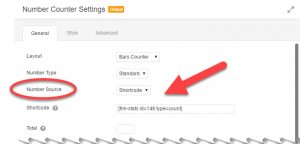
While there are other ways to connect some dynamic (changing) data to settings within some modules, they’re not yet universal and require the additional purchase of either Beaver Themer or other third-party solutions. Recently I set out to see if I could find another solution for adding dynamic content. One that would allow a greater variety of sources and…

Beaver Builder has a number of cool options for displaying images in your layouts and adds useful metadata through Schema.org structured data and HTML markup in its code. In order to ensure that you maximise the potential for your images to be displayed in search engine results, you should add metadata and optimise images for best results. Follow these tips to get the best SEO optimisation results for your images.

The Beaver Builder Theme is based on Bootstrap – one of the most popular HTML, CSS and JS frameworks for developing responsive, mobile first, websites. By using standard Bootstrap CSS classes you can add unique stand-out elements to your page. In this post, we show you some great examples.

Beaver Builder is different from other page builders in that it doesn’t use shortcode wrappers to display your content. Beaver Builder is made for live, front end editing. So you can design and view the outcome of your pages instantly. You’re not left sitting in the admin area of WordPress wondering what your page design…

In this video, David Waumsley takes an in-depth look at the Content Grid module available in PowerPack by BeaverAddons.

One of the advanced modules in Beaver Builder is the Subscriber module which let’s you collect subscriber names and email addresses from your website visitors. The module has many great built-in email services like ActiveCampaign, Mailchimp and more.

Take a look at the top header bar on Beaver Brains and you’ll notice some colourful social icon links for our Facebook, Twitter and Instagram networks. Thanks to David Waumsley’s article here, we were able to add these icons using Font Awesome and the standard WordPress menus. If you are using the Beaver Builder theme,…

In this exercise, I’m looking at how WordPress and Beaver Builder handle images, compression applied, cropped sizes and display variations for responsive display settings. WordPress jpg compression When you upload a JPG image to your media folder, WordPress automatically applies an 82% compression to the file. WP does not apply any compression to your original…
This may seem obvious to some, but it did stump me for a while. I have a sidebar to the right of these posts to display various widgets throughout the site. I add buttons, links and other items as I need them. The thing is, the sidebars were only displaying up on desktops and were…

Reusing layouts is a great way to speed up your development. Creating page templates to use again and again on your site is a real time winner, and if you create global templates, you’re really taking advantage of Beaver Builder powers. But what if you want to reuse your templates on other websites? Perhaps you’ve…